At a glance
A sensible starting point for a repeatable personal task list. Begin with a small system and upgrade only for a specific plan limit or feature you actually need.
Todoist
Best for: People collecting tasks from several areas of life; Recurring administrative work; Individuals who want a task-focused daily view
How Todoist fits personal task management, what recurring dates change, and when paying for a larger workspace is justified.
Strengths
- Quick Add recognizes supported natural-language dates
- Recurring dates are available on Beginner, Pro and Business
- Free Beginner plan offers a way to evaluate the workflow
Trade-offs
- Recurring rules need checking before reliance
- Adding tasks is easier than deciding which work is realistic
- Project and filter allowances vary by plan
A task manager should reduce decisions
Todoist is most interesting when unfinished work is scattered across notes, messages and memory. Its features page presents a task-focused workspace with Quick Add and ways to organize work. The purchasing question is whether that structure will help you choose what to do next, rather than simply collect more obligations.
This is a documentation-based review, checked October 13, 2026. Pickora has not measured productivity gains or carried out a long-term personal-use trial. The workflow examples below are editorial suggestions you can evaluate with your own tasks.
Start with fewer projects
For a first week, try three broad projects: work, personal administration and ongoing ideas. Capture tasks with a clear verb and a useful endpoint. “Website” is difficult to complete; “check the contact form on mobile” describes a concrete action. Avoid building a large taxonomy before you know how you will retrieve the work.
At the end of each day, decide which unfinished tasks genuinely need another date. A crowded daily list can make the interface look organized while hiding an unrealistic workload. Repeatedly moving every task to tomorrow is a planning signal, not a reason to add more labels.

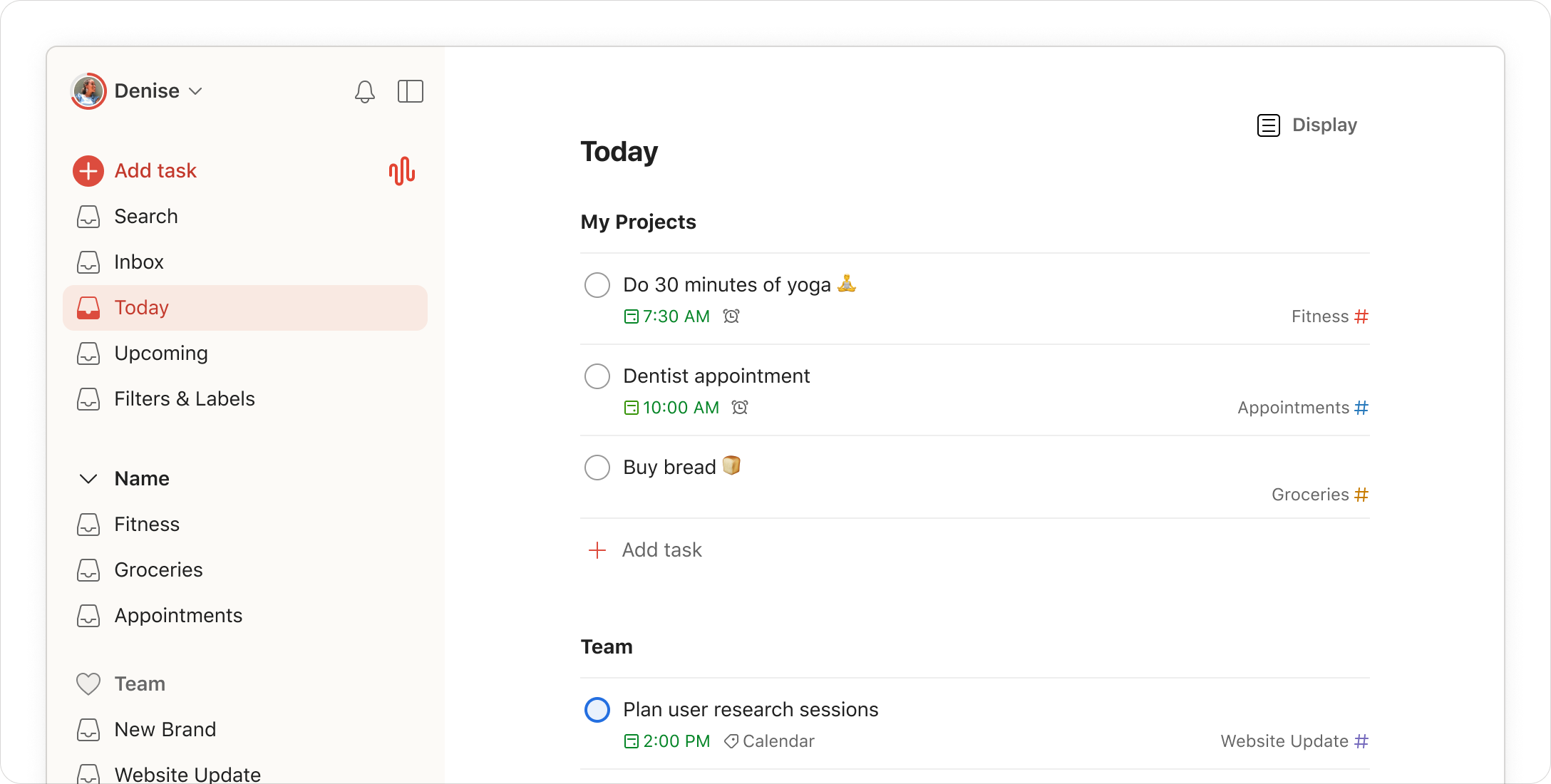
Todoist’s official illustration of organized everyday work; not a screenshot of recurring-date behavior.
Recurring dates deserve a quick check
Todoist’s recurring-date documentation says supported natural-language phrases can be entered through Quick Add, with the recognized date highlighted. Completing a recurring task advances it to a subsequent occurrence; future instances are normally hidden unless enabled in the calendar layout. These features are available across Beginner, Pro and Business.
The practical implication is that a repeating task is not simply a stack of ordinary dated tasks. Before relying on a rule, inspect the interpreted date and what happens after completion. A weekly review and a task that recurs after completion can serve different purposes. Use the documented syntax for the behavior you intend instead of assuming every repeating phrase behaves identically.
For example, a weekly publishing check can contain a short description of what to inspect. Keep the result somewhere durable if you need an audit trail; ticking the reminder is not the same thing as retaining evidence of the review. A task list helps prompt an action, but it does not establish that the action was performed correctly.
Do you need Pro?
The current plan table lists five personal projects for Beginner and 300 for Pro, alongside different custom-filter limits. That is a reason to check a concrete restriction, not a reason everyone should upgrade. A small, well-maintained project list can be more useful than a large workspace you rarely review.
Write down the exact requirement before paying: more active projects, a particular view or an advanced reminder capability. Verify its current plan availability. Do not assume a feature shown in a marketing screenshot is included in every tier. We leave paid currency rates out of this review because the purchasing page is localized and the final billing selection matters.
A good exit condition
After a representative week, ask whether you can find a task quickly, distinguish commitments from ideas, and keep the daily view credible. Also check the devices on which you actually capture work. A system that only works when you are at a desk may not solve the original problem.
Todoist is a strong candidate to evaluate for personal execution and recurring administration. If your tasks need extensive research, shared specifications or a knowledge base attached to every item, compare a document-centered workspace too. The right choice depends on the information around the task, not on which product has the longer feature list.
Pricing and plans
Beginner is free. Compare Pro and Business against your actual project, filter and collaboration needs; confirm localized checkout pricing.
Plan documentation checked October 13, 2026. No fixed paid rate is quoted because region and billing selection affect the offer.
Questions & answers
Do I need Pro to try recurring dates?
The current official recurring-date guide lists Beginner, Pro and Business. Other capabilities have their own plan requirements.
Should I create a separate project for every small task?
Not necessarily. Begin with a structure you can review reliably, then expand only when the organization solves a real retrieval problem.