At a glance
A reasonable individual password-manager candidate to evaluate through the free plan. Decide on paid extras after verifying your devices, vault access and recovery arrangements.
Bitwarden Password Manager
Best for: Individuals comparing a free cross-device password manager; People willing to plan vault access and recovery; Users who want to evaluate browser autofill before migration
A documentation-based review of Bitwarden for individuals, covering free and paid plans, browser use and a careful migration checklist.
Strengths
- Free individual plan offers password storage across devices
- Browser extension documentation explains search and autofill
- Premium is separately priced from a household plan
Trade-offs
- A migration needs verification, not just an import button
- Access and two-step-login recovery require planning
- Paid features and account recovery should not be assumed to mean the same thing
Evaluate access before extras
A password manager becomes useful when you can store, retrieve and update the right login reliably across the devices you actually use. Bitwarden’s plan documentation offers a free individual starting point, with separate paid personal and household options. That makes it possible to evaluate the basic routine before choosing a subscription.
This review is based on Bitwarden documentation checked October 13, 2026. Pickora has not performed a cryptographic audit, penetration test or independent security assessment. A documented feature is not a guarantee that an account cannot be compromised or that a particular recovery arrangement will suit every person.
Test a small, recoverable workflow
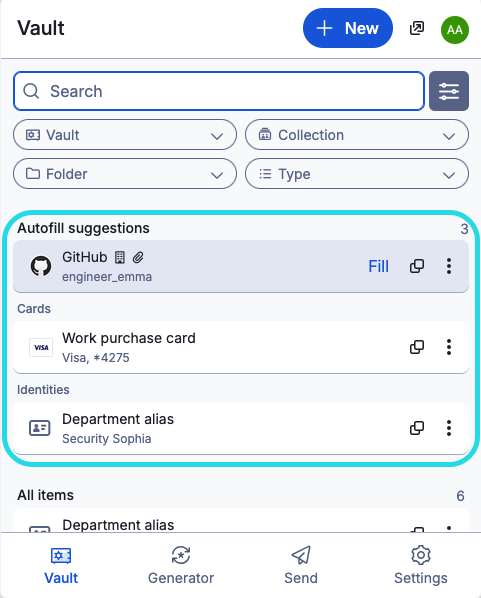
Begin with a few low-risk accounts rather than migrating everything immediately. Install from the official distribution path, check that you can unlock the vault, and verify that a saved item opens the intended website. Follow the browser-extension guide for the documented interface and autofill behavior.
Try the situations that tend to cause friction: two accounts on one site, a changed login, and a locked vault after you step away. Check your chosen timeout and unlock settings on each device. The relevant question is whether your routine is both understandable and dependable, not how many entries fit into the interface.
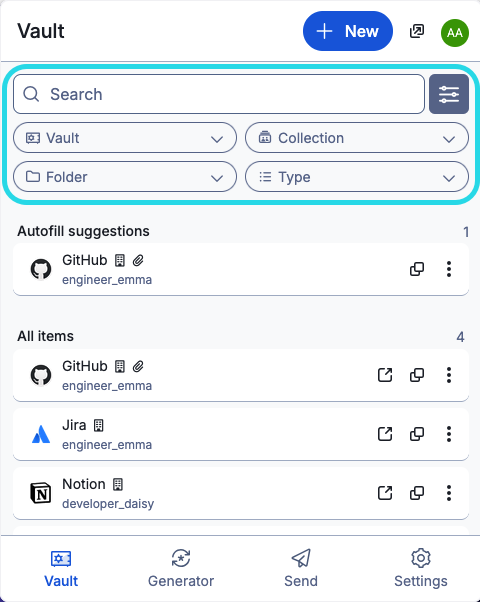
Official documentation image using demonstration accounts. It is not Pickora’s vault.
Keep a migration reversible until it is checked
If you already use another manager, retain your working access while you verify the new setup. Confirm that imported items include the details you need and that important accounts can still be reached. A successful import message does not establish that every item is complete or correctly matched.
An exported credential file can itself be sensitive. Follow the tools’ official export and import guidance, keep the file under your control, and remove unnecessary copies once the verified migration is complete. Do not upload it to an unrelated converter or send it to someone for troubleshooting.
Plan what happens if a device is lost, a vault remains locked, or a second factor becomes unavailable. Review the applicable account and two-step-login recovery documentation before making the vault your only route to important accounts. Avoid interpreting a paid subscription as a blanket promise of recovery in every situation.
Premium is a specific purchase
The pricing page currently gives Premium as $19.80 per year and Families as $47.88 per year for up to six users. Its smaller monthly numbers are annual-billing equivalents. This distinction matters when comparing the immediate charge with a monthly competitor.
Compare the paid features against a written requirement. If the free vault covers the routine you need, paying solely because the subscription appears inexpensive may add little value. If a household needs shared access, inspect who owns the shared information and who should retain independent personal access. A shared plan is an access decision as well as a price decision.
A useful acceptance checklist
Before settling on the product, confirm that you can find the right item, update a changed credential, understand the lock behavior, and follow the relevant recovery instructions. Repeat this on the devices you rely on, rather than assuming the browser experience describes every app.
Bitwarden is worth evaluating for an individual who wants a free entry point and a documented browser workflow. The strongest reason to keep it is a verified daily routine you understand. We do not award a security score or call it the safest manager: the evidence behind this article supports a purchasing workflow, not an independent security ranking.
Pricing and plans
Free, Premium and Families are different individual/household choices.
USD rates checked October 13, 2026; monthly equivalents below are billed annually, not month-to-month subscriptions.
Free — $0
Evaluate the core individual vault workflow.
Premium — $19.80/year
$1.65 monthly equivalent, billed annually
Families — $47.88/year
$3.99 monthly equivalent, billed annually
Up to six users; review sharing and access requirements.
Questions & answers
Is this an independent security assessment?
No. This review evaluates documented plans and everyday workflows. Pickora has not performed a cryptographic audit or penetration test.
Should I remove my current manager as soon as I import?
Keep working access while verifying the migration, important items and recovery arrangements. An import success message alone does not verify every credential.