At a glance
A candidate for a light everyday or travel-day load if the documented layout suits your kit. Check laptop fit and loaded comfort directly; this review does not establish hiking performance or airline acceptance.
Osprey Daylite Plus
Best for: A light everyday carry shortlist; Travel-day essentials rather than a complete luggage replacement
Assess the Daylite Plus’s 20-litre layout, laptop sleeve and travel features, with a realistic packing and fit checklist.
Strengths
- 20-litre layout with several external pockets
- Interior sleeve and luggage pass-through documented
Trade-offs
- Laptop fit depends on the device and case
- Capacity alone does not establish loaded comfort
- No waterproofing or airline acceptance claim made
- Published volume
- 20 litres
- Published weight
- 0.585 kg for the listed version
- Interior sleeve
- Osprey says it fits most 14-inch laptops or a tablet; verify your own device
A daypack is easy to choose from a volume figure and harder to choose from an actual morning routine. A laptop, lunch, water bottle and extra layer create a different load from a light sightseeing kit. The Daylite Plus should be assessed against the things you will carry, not an imagined all-purpose packing list.
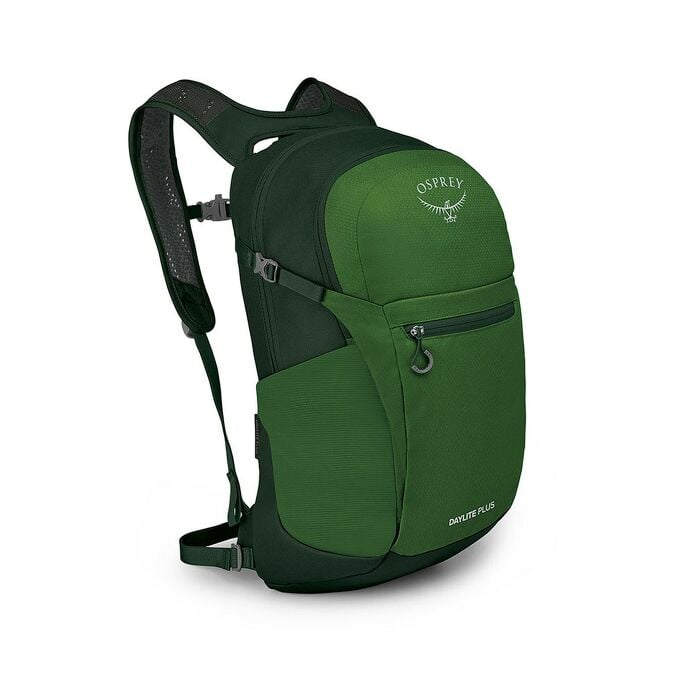
This review uses Osprey’s official product documentation checked on October 13, 2026. Pickora has not worn the pack, measured rain resistance or tested its load capacity. The opening image is Osprey’s product photo, not a field-test photograph.
The layout and its limits
Osprey’s Daylite Plus listing specifies 20 litres and a published weight of 0.585 kg for the listed version. It describes an interior sleeve for a hydration reservoir or most 14-inch laptops, side bottle pockets, front storage and a harness handle that can act as a luggage pass-through.
Those features make it worth considering for a light everyday load or a travel day. They do not establish that every item you own will fit comfortably, or that the bag is suitable for a demanding hike. The interpretation depends on your packing list and loaded fit.
Start by laying out what you actually carry. Separate items that need protected placement from things you want to reach quickly. A capacity number gives you a starting point; it does not show how well your particular objects share the available space.
Check the laptop before calling it a work bag
The phrase “most 14-inch laptops” is narrower than a universal compatibility promise. Compare your device dimensions, any protective case and the sleeve opening. A thick case can change the fit even when the diagonal screen size appears suitable.
If laptop protection is a priority, inspect the sleeve arrangement and your intended packing around it. Do not infer impact protection from the presence of a sleeve alone. Keep cables and small accessories organized so they do not make reaching the computer unnecessarily awkward.
Try loading the laptop along with the rest of the workday kit. A bag that fits the computer by itself may be less useful when lunch, a bottle and a layer compete for the same space.
Evaluate access with a simple packing trial
Create two realistic loads: an ordinary workday and a short outing. Use the items you already own rather than buying smaller accessories to make a prospective bag appear to fit.
| Trial | Pack | Check |
|---|---|---|
| Workday | Device, charger, lunch and bottle | Sleeve access and space for other items |
| Day out | Layer, essentials and water | Easy access to frequently used items |
| Travel connection | Your normal day kit | Luggage-handle fit and packed dimensions |
Open and close the compartments with the bag loaded. Check whether the item you use most often is accessible without unpacking the rest. If the arrangement only works when an essential item stays at home, the volume or layout may not match your routine.
Comfort still needs a loaded check
A manufacturer’s feature list cannot establish comfort for your body and load. If you can inspect the pack, wear it with a representative load, adjust the straps and notice where it contacts you. Check how it behaves while you move, rather than judging a brief empty-bag fit.
If you intend to carry substantially more gear or use it for long outings, compare a pack designed around those needs. More pockets do not substitute for a suitable carrying system. We have no field evidence that lets us rank this model’s comfort against another pack.
Travel and weather questions to settle separately
The documented luggage pass-through may be useful in a travel workflow, but inspect it with your luggage handle if that feature is central to the purchase. Do not turn the presence of a travel feature into a blanket airline-acceptance claim.
Airline size rules vary; compare the current rule with the packed bag’s actual dimensions. For weather exposure, check the applicable manufacturer guidance and protection for the contents. This review makes no waterproofing claim.
The Daylite Plus belongs on a shortlist when a light 20-litre layout matches an identified carry routine. If laptop fit, wet-weather use or loaded comfort is a non-negotiable, settle that question directly before ordering. The most useful next evidence is a real packing and wearing trial, rather than another speculative capacity comparison.
Questions & answers
Will it fit every 14-inch laptop?
No guarantee is made. Osprey’s wording is most 14-inch laptops. Check the device dimensions, case and access to the sleeve.
Is it an airline-approved personal item?
That cannot be established from capacity alone. Compare current airline dimensions and your packed bag before travel.