At a glance
For a simple owner-edited business site, evaluate the visual builder first. For an existing custom site, evaluate how the code, CMS and deployment fit together. Starting a new Cloudflare application also calls for reviewing Workers, which Cloudflare now prioritizes.
The comparison
Choose Cloudflare Pages: You already have a maintainable site and someone responsible for its content system and build process.
Choose Hostinger visual website builder: You want to assemble and revise the website visually without managing a site repository.
| Criterion | Cloudflare Pages | Hostinger visual website builder |
|---|---|---|
| Routine edits | Use the site’s chosen CMS or source files, then deploy. | Use the visual builder’s editor. |
| Design responsibility | The site implementation controls components and layout. | The builder’s available controls and templates set the workflow. |
| Budget | Hosting limits are one part of the cost; development and other services are separate. | Check commitment, renewal, add-ons and the plan’s included features. |
| Moving later | Source-controlled code can support a migration, but integrations still need work. | Content export is not a full layout-and-feature export. |
Cloudflare Pages
Best for: Owners who have a developer or a working code-and-content workflow.
Deployment for a site you build elsewhere. The editor and content system are separate choices.
Hostinger visual website builder
Best for: Owners who want to edit pages visually and accept the builder’s feature boundaries.
A visual editing route for owners who want to change page content and layouts in a hosted builder.
Who should choose each option?
Cloudflare Pages: You can maintain the build and CMS; You need an existing custom layout or code workflow
Hostinger visual website builder: Visual page editing is the central requirement; You can work within the builder’s supported features
The useful comparison is not simply which company hosts a website. It is who will change a page next Tuesday, what happens when that change fails and whether you can maintain the site after its first launch.
This comparison uses official documentation checked on October 13, 2026. It does not measure uptime, loading speed or support response times. The workflow judgments are editorial analysis; Hostinger’s visual builder is considered here, rather than its separate WordPress hosting products.
Two different kinds of website work
Cloudflare Pages deploys an implementation you provide. Its Git integration guide describes connecting a repository and configuring a build. A visual editor, article database or CMS has to come from the site you build; deployment alone does not create those tools.
Hostinger’s builder page describes visual drag-and-drop editing. Its support documentation now uses AI Builder manual-mode terminology for the visual-builder export workflow. Confirm the particular product and mode being sold, rather than treating every Hostinger website service as interchangeable.
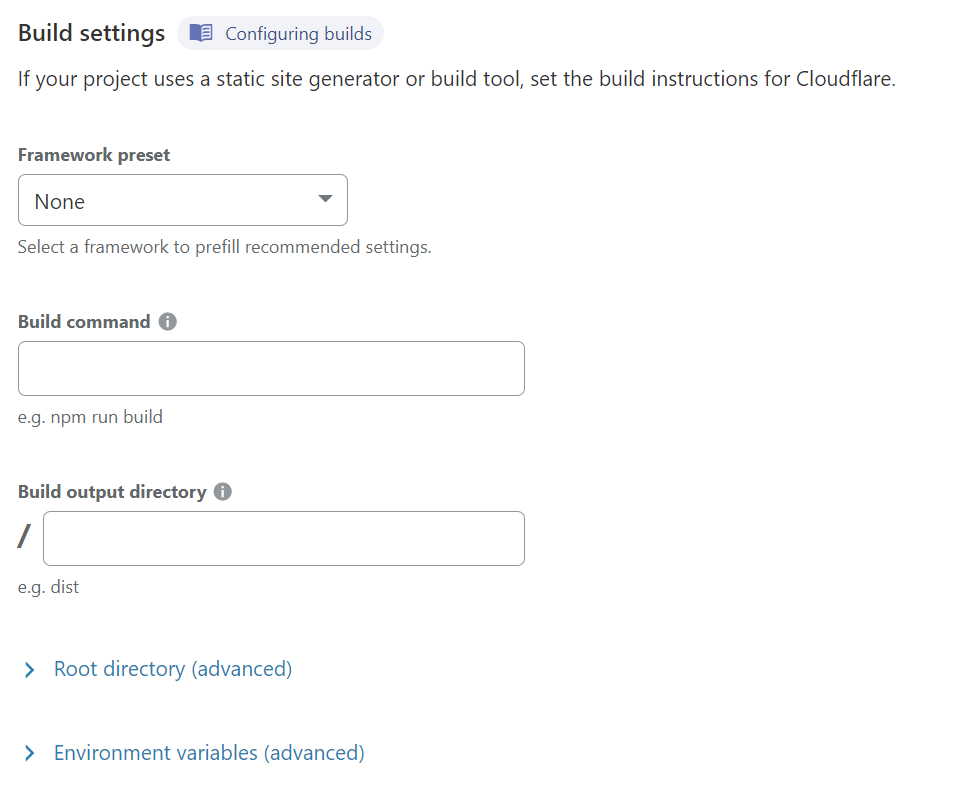
Official Cloudflare documentation image. Build configuration is a different task from editing an article or dragging a page section.
Imagine a small consultancy that needs to replace a service description once a month. A visual page editor may cover most of its routine work. Now imagine a publication with product records, comparison templates and a content import pipeline. Its editor needs structured data and reliable publishing behavior, not just a way to reposition a paragraph.
Neither owner should choose from a homepage demonstration alone. Ask to complete the edit that occurs most often in the actual business.
Put the editor through a realistic change
Prepare a short exercise: create a page, replace an image, adjust the phone layout and correct the navigation label. If the site will be a blog, add an article and check where it appears. If several people will work on it, check their access and approval workflow too.
For a code-based site, include the person who will maintain the implementation. Can the owner make a content change without opening source files? Does a failed build leave the existing site available? Is there a documented route back to a working version? These questions reveal whether the setup is suitable for an owner who mostly wants to publish.
For a visual builder, check the limits of the editor with the exact layout you need. Avoid assuming a custom filter, comparison table or import process is supported because a simple landing page is easy to assemble.
Compare costs over the same period
Pages has a Free plan with published deployment and asset limits; paid services or functions can introduce other usage. A free hosting tier is not a promise that development, a domain, email and a CMS cost nothing.
For the builder, record the amount charged now, the commitment length, renewal cost and optional services. A monthly equivalent shown for a long prepaid term is different from a month-to-month payment. This article does not quote a regional checkout price because plan, location and promotion can change it.
Include maintenance in the comparison. A developer’s occasional repair, a paid extension and time spent rebuilding an unsupported feature all belong in the decision. The lower hosting invoice can still be the less suitable complete workflow.
Keep an exit plan
Hostinger’s WordPress export guidance states that regular content can be exported, but styles, layout, store features, integrations, forms and SEO settings are not all included. Do not confuse that content transfer with a complete move of the website.
A source-controlled implementation can also have dependencies: a CMS, external database or framework version may need changes on another host. Keep a record of where content and media live, which services are required and who controls the accounts.
Ask what you would receive if you stopped paying or changed providers. A small test export is more useful than an assumption based on the word “backup.”
A Cloudflare decision for a new project
Cloudflare’s current Pages overview recommends Workers for new projects and describes it as the primary application platform. Pages remains relevant to understanding an existing deployment, but this comparison should not be read as a blanket recommendation to start every new site on Pages.
For an existing custom publication, judge whether its editor and publishing pipeline are maintainable. For a new owner-operated brochure site, evaluate the visual editing experience first. For a new coded application, include the current Workers guidance in the technical choice. Those are three distinct decisions, even if all three involve putting a website online.
Questions & answers
Is Pages a drag-and-drop website editor?
No. It deploys a site built through another workflow. You need to choose and maintain the editor or CMS separately.
Can I move a builder website without rebuilding anything?
Do not assume that. Hostinger’s documented WordPress content export excludes styles, layout and several other site features. Plan a migration around the actual destination.